


Quick Answer: Which WDS Alternative Should You Choose?
Microsoft plans to deprecate the Windows Deployment Services (WDS) server role beginning with the next Windows Server release. The planned change includes WDS-provided PXE boot functionality, WDS management interfaces and services, and WDS multicast capabilities. WDS continues to be supported on currently supported Windows Server versions, so organizations do not need to remove it immediately. However, Microsoft is advising organizations to start identifying WDS dependencies and planning their migration.
The right WDS alternative depends on what your deployment environment actually uses WDS for:
| Your current WDS workflow | Migration path to consider |
|---|---|
| PXE boot + WinPE + Windows image deployment | Wittytool Disk Clone or another image-based deployment solution |
| Configuration Manager OSD + WDS-backed PXE | Configuration Manager PXE responder without WDS |
| Cloud-first Windows provisioning | Windows Autopilot + Intune |
| Open-source network imaging | Similar self-hosted solutions |
| Network boot infrastructure | Independent PXE or HTTP Boot solutions |
| WDS multicast-heavy deployment | Reassess the deployment architecture, network capacity, and rollout strategy |
For organizations that use WDS mainly to PXE-boot PCs, start a WinPE environment, and deploy a configured Windows image to multiple computers, Wittytool Disk Clone is a relevant migration path. It combines PXE-based deployment, WinPE creation, and centralized Windows image deployment without requiring the organization to move entirely to a cloud-based provisioning model.
The important point is that there is no single replacement that reproduces every WDS function. Instead, identify the WDS functions your environment depends on and choose the deployment architecture that replaces those functions.
What Is Changing with WDS?
On September 21, 2026, Microsoft announced that it plans to deprecate the WDS server role beginning with the next Windows Server release.
According to Microsoft’s official WDS deprecation guidance, the planned deprecation includes:
- The WDS server role and its Deployment Server and Transport Server role services
- WDS-provided PXE boot and network bootstrap functionality
- WDS management tools, command-line interfaces, APIs, and related service activation paths
- WDS multicast transport and WDS-dependent multicast deployment workflows
- WinPE components specifically used to create or operate WDS clients, including WinPE-WDS-Tools
Microsoft describes the announcement as early notice to help organizations identify dependencies and begin migration planning.
Planned Deprecation and Existing Server Support
Deprecation does not mean that WDS stops working immediately.
Microsoft states that WDS will continue to work on currently supported Windows Server versions according to their published servicing lifecycles. The September 2026 announcement does not change WDS availability or support on those releases.
Microsoft also has not yet announced the exact Windows Server release in which WDS will be completely removed. The current guidance states that removal could occur in a future LTSC release or several releases later.
For organizations running Windows Server 2025 or another supported release, the practical approach is therefore not an emergency uninstall. Instead, use the remaining support period to:
- Inventory existing WDS dependencies.
- Identify which deployment functions actually require WDS.
- Build and test the replacement workflow.
- Migrate workloads in stages.
The larger architectural message is clearer: WDS is no longer a good foundation for a new long-term deployment environment.
Windows 11 Deployment Limits vs. PXE Boot
WDS had already started to lose functionality before the broader server-role deprecation was announced.
Microsoft’s WDS boot.wim support documentation explains that, starting with Windows 11, deployment workflows relying on the boot.wim from Windows installation media and running Windows Setup in WDS mode are no longer supported.
This distinction is important because Windows 11 WDS deployment and WDS PXE boot are not the same thing.
Microsoft states that the boot.wim-based Windows Setup workflow is blocked for Windows 11, while WDS can still PXE-boot devices using supported custom boot images.
Microsoft’s 2026 WDS guidance also notes that hands-free deployment scenarios were disabled by default and became unsupported after updates released on or after April 14, 2026.
So a typical legacy workflow such as:
PXE → WDS → installation-media boot.wim → Windows Setup
is already affected for Windows 11.
A workflow such as:
PXE → custom WinPE → deployment tool → Windows image
is a different scenario and should be evaluated separately.
WDS Alternatives by Deployment Scenario
The best way to evaluate WDS alternatives is to start with the workflow rather than the product name.
Microsoft Configuration Manager for Existing OSD Environments
If your organization already uses Microsoft Configuration Manager for operating system deployment, the most direct migration path is to remove the WDS dependency from the PXE portion of the workflow.
Configuration Manager provides a PXE responder that does not require WDS. Microsoft’s documentation explains that the option Enable a PXE responder without Windows Deployment Service allows a distribution point to respond to PXE requests without installing WDS. The responder also supports IPv6.
See Microsoft’s Configuration Manager PXE deployment documentation and distribution point documentation for the current implementation.
This path is especially relevant when your deployment environment already uses:
- Configuration Manager task sequences
- Distribution points
- Configuration Manager boot images
- PXE-based OSD
- Existing Configuration Manager infrastructure
Microsoft specifically recommends that organizations using Configuration Manager’s WDS-backed PXE option migrate to the Configuration Manager PXE responder without WDS.
There is one important limitation: WDS-dependent multicast is not supported by the Configuration Manager PXE responder without WDS.
If your organization relies heavily on multicast, the PXE migration therefore needs to be considered together with network bandwidth, deployment concurrency, and rollout scheduling.
Wittytool Disk Clone for PXE, WinPE, and Windows Image Deployment
A different migration scenario applies when WDS is primarily being used as part of a traditional image-based workflow.
A common pattern is:
PXE Boot → WinPE → Windows Image → Multiple PCs
In this environment, the objective is usually straightforward: boot target computers over the network, enter a deployment environment, and apply a configured Windows image to multiple machines.
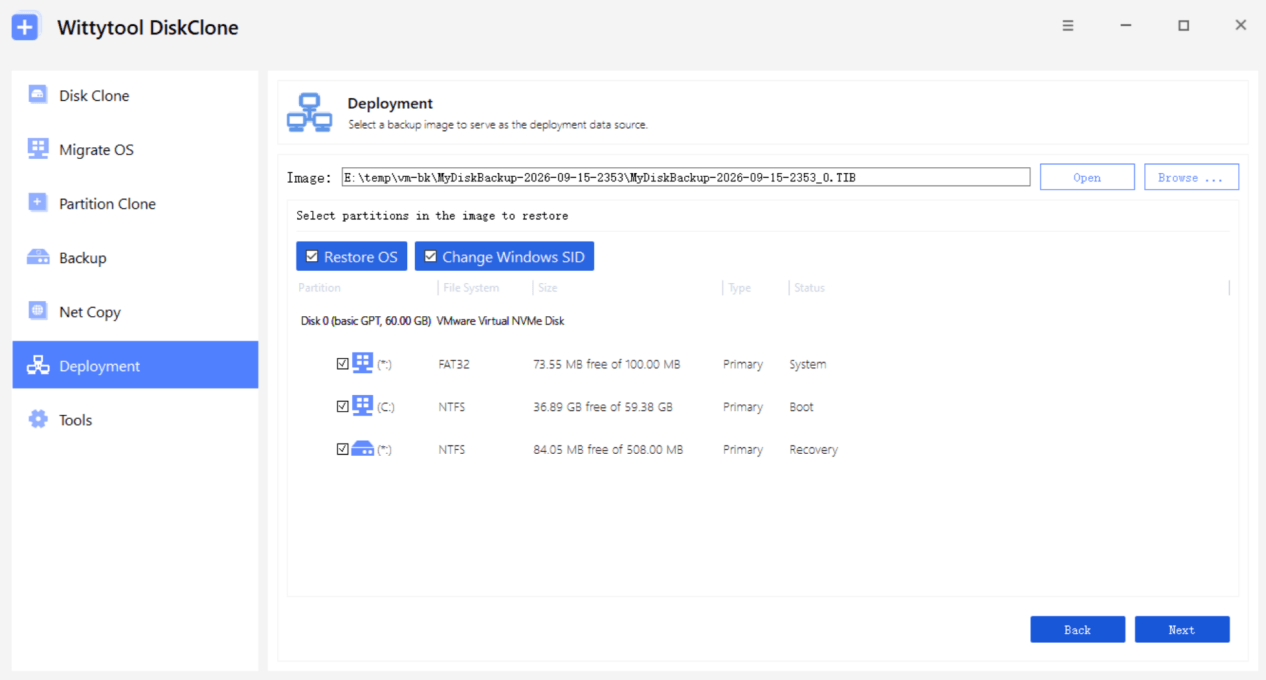
Wittytool Disk Clone is designed around this type of workflow. It supports PXE-based deployment, can create a WinPE boot environment, and provides centralized Windows image deployment to multiple PCs.
For WinPE-based workflows, Wittytool Disk Clone also supports creating a WinPE bootable environment, allowing its disk and system-management functions to run outside the installed Windows environment.
For the image deployment stage, the Windows image deployment solution for multiple PCs provides automatic and manual deployment modes, centralized management, real-time progress monitoring, and support for different hardware configurations through Universal Restore.
The current deployment workflow also supports deploying an existing Windows system image without running Sysprep first, with an option to change the Windows SID during deployment when needed.
This makes Wittytool Disk Clone particularly relevant when the objective is to keep an image-based deployment model while moving away from WDS.
It should not be described as a one-to-one replacement for every WDS feature. A more accurate description is that Wittytool Disk Clone can replace the core parts of a traditional deployment workflow centered on:
- PXE boot
- WinPE
- Windows image deployment
- Multiple-PC deployment
For example, an IT team that currently uses WDS to PXE-boot new PCs, launch a deployment environment, and deploy a prepared Windows image can preserve that general workflow without moving entirely to cloud-based provisioning.
For LAN-based deployment scenarios, you can also review this guide to cloning computers over a network.
Other Image-Based Deployment Solutions
Some organizations may prefer a dedicated third-party OS imaging platform rather than a Microsoft-native deployment stack.
Products such as AOMEI Image Deploy, Acronis Snap Deploy, and ManageEngine OS Deployer fall into this general category. Their implementations differ, but the common model is to capture or prepare a standardized operating system image and deploy it to multiple target computers.
These solutions can be relevant when your requirements include:
- Centralized image deployment
- PXE or bootable deployment workflows
- Deployment to multiple computers
- Hardware-independent deployment
- Unicast or multicast options
- Automated or scheduled deployment
However, feature overlap does not necessarily mean that every imaging product is interchangeable with WDS.
When comparing a dedicated imaging solution with your existing WDS environment, check whether it covers the specific combination of PXE, WinPE, image deployment, hardware support, automation, and network architecture that your organization relies on.
Open-Source Imaging with FOG and Clonezilla
Open-source imaging approaches can also be considered when an organization wants to maintain more control over its deployment infrastructure.
FOG Project provides network-based imaging capabilities and can support PXE-oriented deployment workflows, including multicast scenarios.
Clonezilla focuses on disk and system imaging, while Clonezilla Server Edition provides capabilities for large-scale deployment and multicast cloning.
These options may make sense for organizations that are comfortable managing their own deployment servers and network infrastructure.
However, they should be evaluated as imaging solutions rather than assumed to be complete replacements for every WDS service, management interface, or Windows lifecycle capability.
Independent PXE Solutions for Network Boot
Some WDS environments use WDS mainly because it provides network boot infrastructure.
In that case, a dedicated PXE or HTTP Boot solution may be sufficient for the network-boot portion of the workflow.
Tools such as Serva, iPXE, and iVentoy can be considered for specialized network-boot scenarios.
However, network boot and Windows image deployment are separate functions.
A PXE server can answer:
How do I start the deployment environment?
It does not automatically answer:
How do I capture, manage, customize, and deploy the Windows image?
This distinction is particularly important during WDS migration. If WDS is currently responsible for both network boot and image delivery, replacing only the PXE server does not complete the migration.
When to Consider Windows Autopilot Instead
Windows Autopilot is worth considering when your organization wants to move away from traditional imaging rather than simply replace WDS.
According to Microsoft’s Windows Autopilot overview, Autopilot uses the OEM-optimized Windows installation already present on new devices. Instead of repeatedly re-imaging those devices, it transforms the existing Windows installation into a business-ready state by applying configuration, policies, applications, and identity settings.
The difference can be summarized as:
Traditional image deployment
Create a configured Windows image → distribute the image → deploy it to target PCs
Windows Autopilot
Start with OEM Windows → enroll the device → apply policies, applications, and configuration
Autopilot can be a strong fit for organizations moving toward:
- Microsoft Intune
- Microsoft Entra ID
- Cloud-based device management
- New-device provisioning
- Reduced on-premises infrastructure
It is less directly aligned with environments where a customized Windows image is itself the core deployment artifact.
That is why Autopilot should not simply be listed as “the new WDS.” It represents a different deployment model.
What to Check Before Migrating from WDS
A successful WDS migration starts with dependency discovery.
Microsoft’s current WDS guidance specifically asks organizations to inventory WDS deployments and identify the deployment, recovery, imaging, and network-boot workflows that depend on them.
PXE, WinPE, and Automation Dependencies
Start by documenting how each deployment workflow begins.
Ask:
- Does the target PC PXE-boot?
- Which PXE server responds?
- Which boot image is loaded?
- Is the boot image based on Windows PE?
- Are custom drivers included?
- Does the WinPE environment launch scripts or deployment tools?
- Does automation depend on DHCP, TFTP, HTTP, or specific network settings?
Do not assume that replacing WDS with another PXE server automatically replaces the entire deployment workflow.
WDS APIs, Scripts, and Custom Components
WDS is more than a PXE server.
Microsoft’s planned deprecation includes WDS management tools, command-line interfaces, APIs, and related service activation paths.
Inventory any scripts, automation, or administrative processes that use:
- WDS APIs
- wdsutil
- WDS management consoles
- Custom WDS service interactions
- WDS-specific WinPE components
A new imaging platform may replace image deployment but leave an old script dependent on WDS.
Image Compatibility and Recapture Requirements
Determine what format and deployment method your current images use.
Ask:
- Is the current deployment based on
install.wimor a captured system image? - Is the image intended for Windows Setup?
- Is it a full system image?
- Does it contain preinstalled applications?
- Does it include user profiles or local accounts?
- Does it depend on a specific hardware configuration?
- Does the target solution require the image to be recaptured?
This is particularly important if your current WDS process uses a Windows installation boot.wim, because Microsoft’s Windows 11 restrictions affect that workflow.
Image-based deployment is a different model and may allow you to preserve an already configured Windows environment rather than rebuilding it from installation media.
Multicast, Network Capacity, and Deployment Batches
Multicast deserves separate attention during migration.
Microsoft plans to deprecate WDS multicast and WDS-dependent multicast deployment workflows. It also states that WDS-dependent multicast is not supported by the Configuration Manager PXE responder without WDS.
Before replacing WDS, determine:
- How many PCs are normally deployed at once
- How much bandwidth is available
- Whether deployment traffic crosses VLANs
- Whether branch offices use local deployment servers
- Whether unicast deployment is practical
- Whether deployment can be split into smaller batches
A deployment architecture that works well for five PCs may behave very differently when used for fifty or several hundred.
Hardware and Application Validation
A replacement deployment workflow should be tested against real hardware.
At minimum, validate:
- UEFI boot
- Secure Boot
- PXE boot
- WinPE startup
- Network adapters
- Storage controllers
- Windows image deployment
- Different PC models
- Application compatibility
- Domain membership or identity requirements
- Multiple simultaneous deployments
- Failure and retry procedures
For image-based deployment, also test whether one configured image can be reliably deployed across the hardware models in your environment.
If your organization regularly clones domain-joined workstations, machine identity should also be included in the validation process. A separate guide on cloning a domain-joined Windows PC while preserving apps and settings covers that scenario in more detail.
Frequently Asked Questions
Is WDS deprecated in 2026?
Yes. Microsoft announced on September 21, 2026, that it plans to deprecate the WDS server role and WDS-provided PXE functionality beginning with the next Windows Server release.
WDS remains supported on currently supported Windows Server versions during the deprecation period.
Can I still use WDS on Windows Server 2025?
Yes. The September 2026 announcement does not immediately change WDS availability or support on Windows Server 2025.
However, Windows 11 deployment workflows that rely on the installation-media boot.wim and WDS mode are already unsupported.
What is replacing WDS?
There is no single replacement for every WDS workflow.
Configuration Manager provides a PXE responder that can operate without WDS for supported OSD environments. Windows Autopilot provides a cloud-based provisioning model, while image-based deployment tools can replace traditional imaging workflows.
The right choice depends on which WDS functions your organization actually uses.
Which WDS alternatives are free?
Several deployment approaches are available without the same licensing model as commercial enterprise deployment products.
FOG Project and Clonezilla are examples of open-source imaging technologies. Other organizations may continue using Microsoft deployment technologies already included in their existing infrastructure.
However, software licensing is only one part of the decision. PXE architecture, hardware support, automation, network capacity, management overhead, and operational requirements should also be considered.
Can I reuse my existing WDS WIM images?
It depends on how the WIM is used.
A WIM created for a particular WDS workflow may not be directly reusable in another deployment architecture. In particular, Windows 11 deployment using the installation-media boot.wim in WDS mode is already unsupported.
Before migrating, determine whether the existing WIM is an installation source, boot image, or captured system image and verify that the replacement deployment method supports that image type.
Do I need Windows Server for image deployment?
Not necessarily.
The deployment architecture determines whether Windows Server is required. Some enterprise deployment platforms use Windows Server infrastructure, while other imaging tools can operate with different server or workstation configurations.
What matters is whether the selected solution provides the network services, storage, PXE or boot mechanisms, and management components required by your deployment workflow.
Does switching from WDS change Sysprep requirements?
Not necessarily.
Sysprep requirements depend on the deployment method, the Windows image, and how the target computers will be configured.
For traditional image-based workflows, organizations should follow the requirements of the selected deployment platform and the Windows scenario being deployed.
Some third-party image deployment workflows can deploy an existing Windows image without running Sysprep first. For example, the current Wittytool Disk Clone deployment workflow supports image deployment without requiring Sysprep and can optionally change the Windows SID during deployment.
What replaces WDS PXE?
There is no single answer.
Configuration Manager provides a PXE responder without WDS for its supported OSD workflows. Other deployment platforms can provide their own PXE services, while independent PXE or HTTP Boot technologies can address specific network-boot requirements.
The correct choice depends on what happens after the target PC boots.
What happens to WDS multicast?
Microsoft plans to deprecate WDS multicast and WDS-dependent multicast deployment workflows.
Organizations that rely on multicast should review network capacity, deployment concurrency, and rollout strategy before moving away from WDS.
A migration to a non-WDS PXE responder should not be assumed to preserve the same multicast behavior.
Conclusion
WDS is entering a transition period, but organizations do not need to replace it blindly or immediately.
Microsoft’s September 2026 announcement gives IT teams time to identify dependencies, evaluate alternatives, and migrate in stages before WDS is eventually removed from a future Windows Server release.
The most useful question is not:
What is the best WDS alternative?
It is:
Which WDS functions does my organization actually depend on, and what supported technology should replace each one?
For PXE boot + WinPE + Windows image deployment, Wittytool Disk Clone provides a migration path that keeps the traditional image-based deployment model.
For Configuration Manager OSD + WDS-backed PXE, the Configuration Manager PXE responder without WDS provides Microsoft’s migration path.
For cloud-first provisioning, Windows Autopilot and Intune use a fundamentally different provisioning model.
For other image-based or open-source requirements, solutions such as FOG, Clonezilla, AOMEI Image Deploy, Acronis Snap Deploy, and ManageEngine OS Deployer can be evaluated according to the specific functions they need to replace.
And for network boot infrastructure, independent PXE or HTTP Boot technologies may address the boot layer without replacing the entire operating-system deployment stack.
A successful WDS migration is therefore less about finding a single product with the same feature label and more about building a deployment workflow that matches how your organization actually provisions Windows devices.