


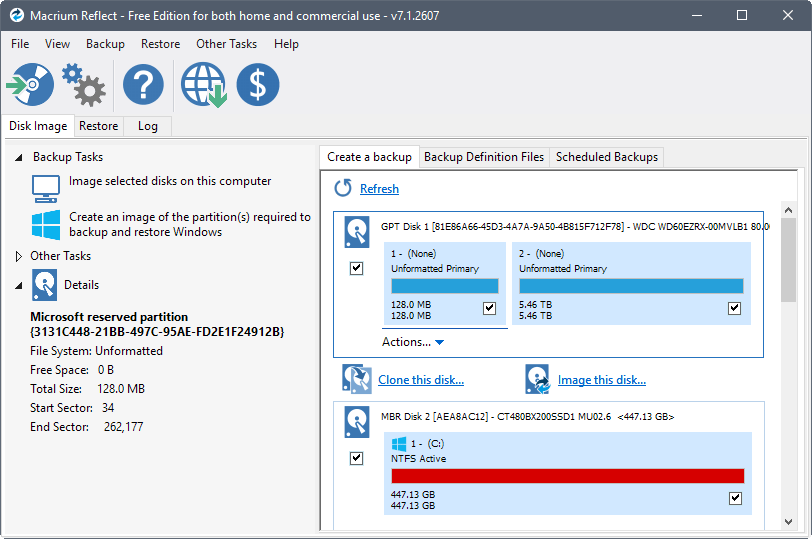
Are you frustrated by the limitations or discontinuation of your trusted backup and clone solution? For many users, Macrium Reflect Free was a go-to choice for creating reliable backups and performing disk imaging. But now, you might be wondering if there’s a Macrium Reflect Free alternative that delivers equal – if not better – results.
It’s a valid concern. When managing your data, downtime or unreliable tools are not an option. You need a solution that’s robust, user-friendly, and cost-effective.
Fortunately, there are powerful and free alternatives available that cater to your backup, cloning, and recovery needs. In this guide, we’ll introduce you to the best option that combines reliability with advanced features, ensuring your data remains safe without compromise. Let’s explore the ideal replacement for Macrium Reflect Free!
Macrium Reflect Free Edition Has Been Retired
For years, Macrium Reflect Free Edition was a trusted tool for disk imaging, backups, and cloning. Its intuitive interface and reliable performance made it a go-to solution for both personal and professional use. However, with the announcement of its retirement, many users are left searching for a replacement that offers similar functionality.
This retirement poses challenges for those who relied on its features, such as creating backups or transferring data. If you’re looking for ways to clone SD card, or performing more advanced tasks like changing SID Windows 10 without Sysprep, finding an alternative is now essential.
The good news is that there are free tools available that can seamlessly take on these tasks, often with added features and enhanced usability. As you transition from Macrium Reflect Free, it’s crucial to choose a solution that not only matches its capabilities but also addresses your current and future data management needs. Let’s explore the best alternatives to ensure you can keep your workflow uninterrupted and efficient.
Best Free Alternative to Macrium Reflect Free
If you’re looking for a reliable and feature-rich replacement for Macrium Reflect Free, Wittytool Disk Clone stands out as an exceptional choice. This free disk cloning and backup software offers everything you need to manage your disks and backups effortlessly, making it the ideal solution for both novice and advanced users. From simple system migration and disk upgrades to advanced operations like Network Clone (which requires no physical drive removal) and seamless MBR to GPT conversions (without reinstalling the OS), it provides an all-in-one disk management solution.
Also learn: Windows 10 System Restore Taking a Long Time: Solutions and Tips
One of its standout features is the ability to clone Windows 11/10 to NVMe M.2 SSD drives seamlessly. Upgrading to faster storage has never been easier – Wittytool DiskClone ensures your operating system, applications, and data are migrated without a hitch, saving you hours of setup time. Additionally, if you’re working with external drives, the tool doubles as a USB clone tool free, enabling you to clone data to and from USB devices efficiently.
Wittytool Disk Clone VS Macrium Reflect Free
Wittytool Disk Clone is not just a replacement; it’s a comprehensive upgrade. The comparison below highlights how it matches all the essential features of Macrium Reflect Free while introducing critical advancements and maintaining active development.
| Feature | Wittytool Disk Clone | Macrium Reflect Free |
|---|---|---|
| System & Disk Cloning | ✅ Core Functionality | ✅ Core Functionality |
| Partition Cloning/Imaging | ✅ Fully Supported | ✅ Fully Supported |
| File Backup & Recovery | ✅ Available | ✅ Available |
| Scheduling | ✅ Available | ✅ Available |
| Network Clone | ✅ Available (Key Advantage) | ❌ Not Available |
| MBR to GPT Conversion | ✅ Non-destructive Operation | ❌ Not Available |
| Cost & Status | Free Trial & Actively Maintained | Free Edition Retired / Discontinued |
| Ease of Use | ⭐⭐⭐⭐⭐ (Streamlined, Modern UI) | ⭐⭐⭐ (More Technical Interface) |
How to Clone Disk Easily via Macrium Reflect Free Alternative
Wittytool DiskClone offers a range of powerful features designed to make disk cloning simple and efficient. Whether you need to clone HDD to SSD for faster performance or replicate a drive for backup, this tool delivers unmatched versatility. It supports clone disk in Windows 11, ensuring smooth operation on the latest systems. Let’s download and follow the steps:
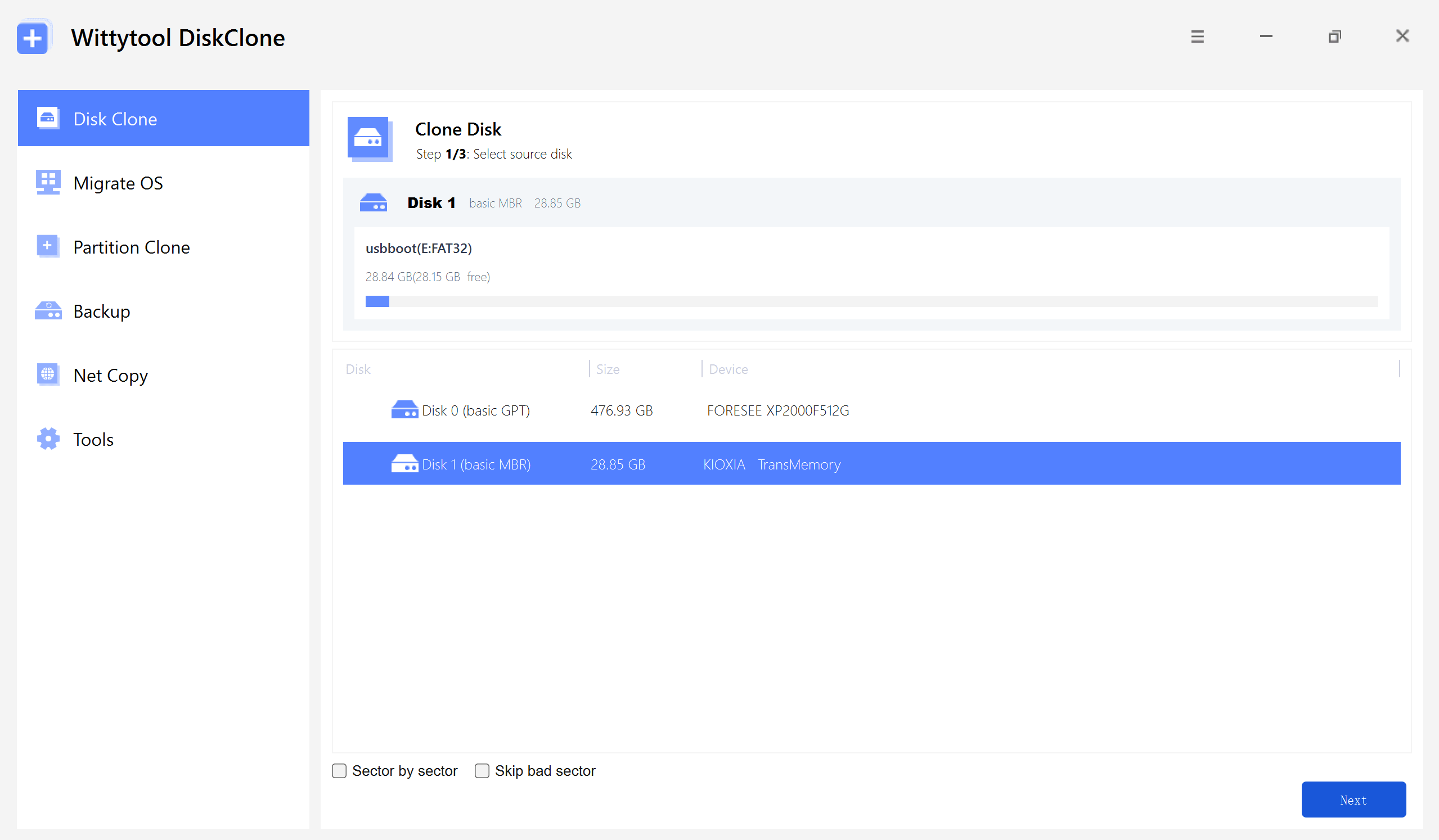
Step 1: Select Disk Clone and the source HDD
Open Disk Clone. Select the HDD you want to copy, match it to the source in your disk map, and then select Next.
Step 2: Select the destination SSD
Select the SSD that will receive the clone. Match it to the destination in your disk map, then select Next.
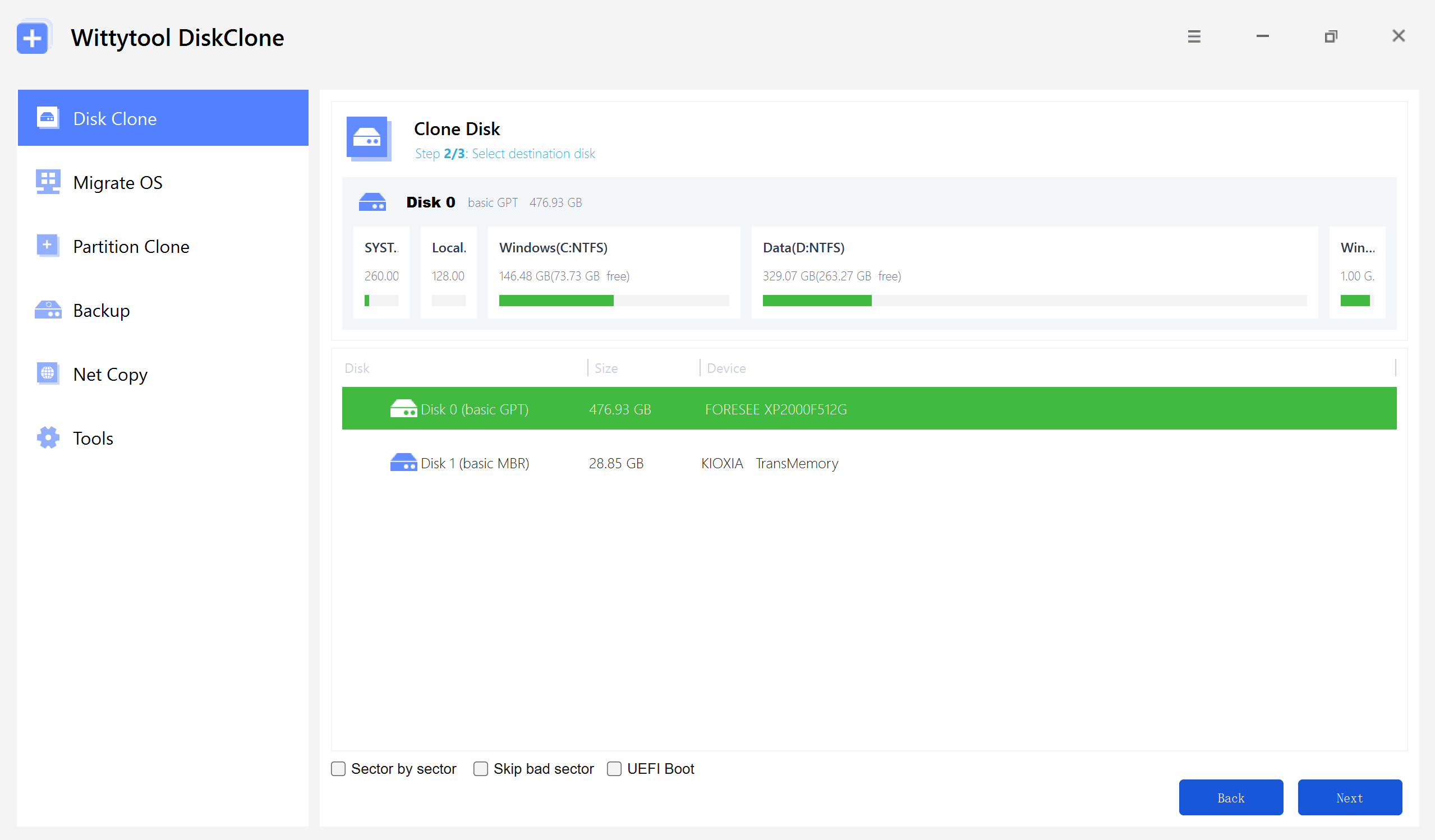
You may see optional controls on this screen. Sector-by-sector cloning, bad-sector handling, and UEFI-related options are outside this guide because they require separate conditions and verification.
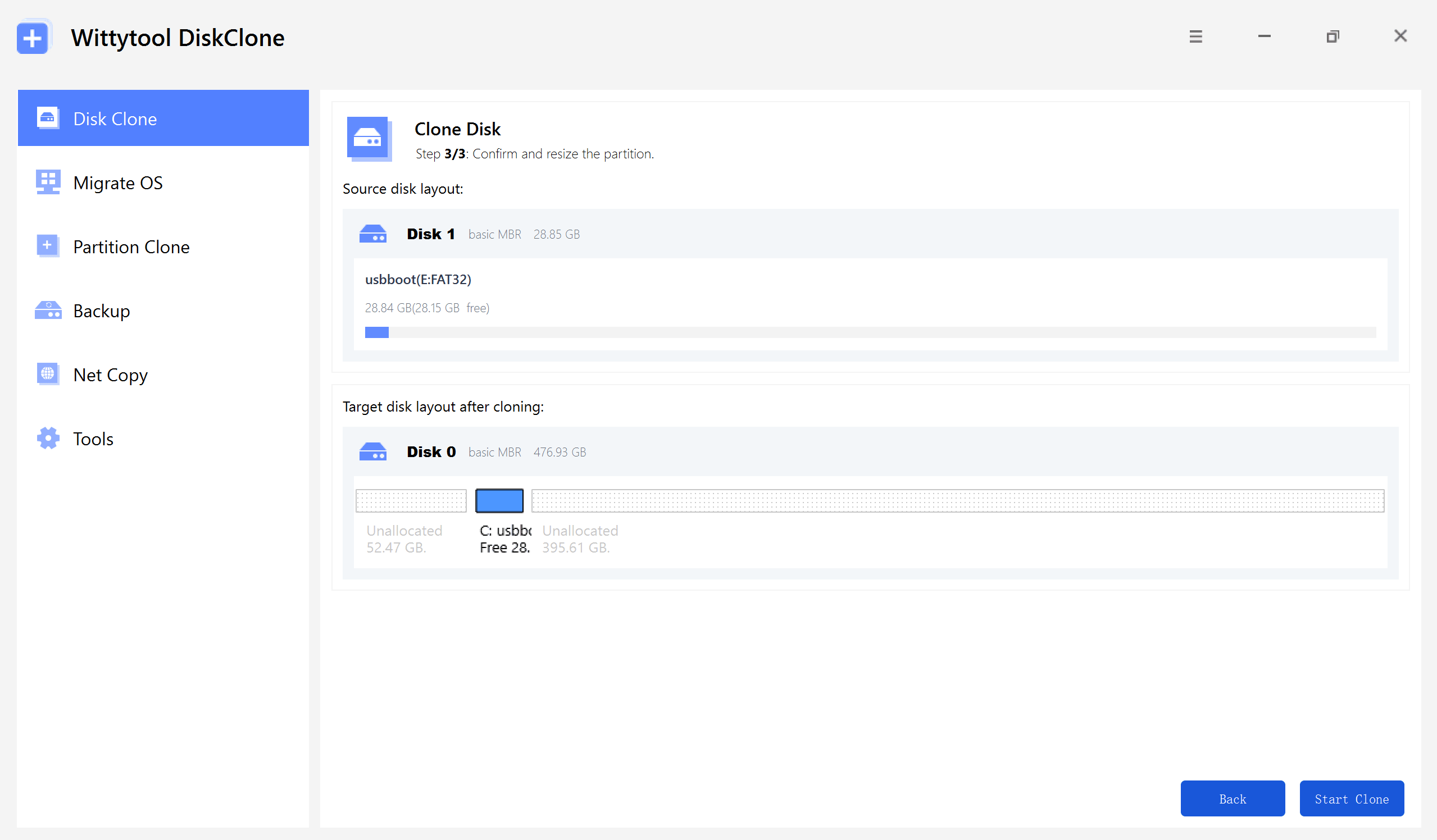
Step 3: Review the target layout
Review the proposed layout on the target SSD. If you change a partition size, confirm that the result is the layout you intend and that the SSD still has enough capacity for the used data.
Step-by-Step Video Guide:
Bonus tip: How to Backup Data Freely
Beyond cloning, Wittytool DiskClone excels in data backup, making it a versatile tool for safeguarding your information. Whether you’re backuping SD card or simply ensuring your files are secure, the software offers robust backup options. It allows you to create a full disk image or selectively back up specific partitions, providing flexibility to meet your needs.
Watch the Video Guide on How to Create a Backup with Wittytool Disk Clone:
Step 1. Turn to Backup tab, click Create backup.

Step 2. Choose the data which you want to backup, then click Start Backup.

Step 3. The software will perform an automatic and fast backup, and once the process is complete, you can easily locate the backup file.
Conclusion
If you’re concerned about the departure of Macrium Reflect, Wittytool Disk Clone is undoubtedly the top alternative to try. We highly recommend downloading and experiencing this robust free tool to make it a cornerstone of your data protection strategy. Don’t forget to share this solution with friends who might be facing the same dilemma!